

Introduction
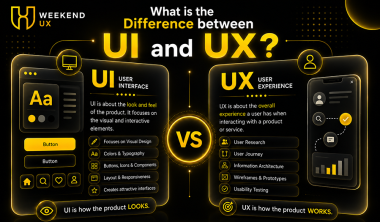
In today’s digital world, creating products that are visually appealing and easy to use is essential for business success. Whether it is a website, mobile application, software platform, or e-commerce store, the experience users have while interacting with a product directly impacts engagement and conversions. This is where understanding what is the difference between UI and UX becomes important.
Many people use UI and UX interchangeably, but they are not the same. They both collaborate to produce great digital goods, but they concentrate on distinct facets of the user experience. Businesses, startups, designers, and developers often seek clarity on what is the difference between UI and UX before starting a design project.
At Weekend UX, we help aspiring designers and professionals understand the fundamentals of UI and UX design through practical learning and real-world projects. In this guide, we will explore the key differences, roles, processes, tools, and career opportunities related to UI and UX design.
What Is UI Design?
UI stands for User Interface. It refers to the visual elements that users interact with when using a digital product. UI design focuses on the appearance, presentation, and interactivity of a website, application, or software platform.
A UI designer is responsible for creating visually appealing interfaces that align with a brand’s identity while ensuring consistency across screens.
Elements of UI Design
Some common UI elements include:
Buttons
Icons
Typography
Colors
Navigation menus
Forms
Cards
Layouts
Images
Animations
The primary goal of UI design is to create an interface that is attractive, intuitive, and engaging.
Example of UI Design
Imagine opening a banking app. The colors, buttons, fonts, icons, spacing, and screen layouts you see are all part of the UI design.
If the app looks modern and visually organized, the UI designer has done their job well.
What Is UX Design?
UX stands for User Experience.
Unlike UI, UX is not limited to visuals. It includes research, strategy, information architecture, usability testing, and user journey optimization.
Elements of UX Design
Key components of UX design include:
User Research
Personas
User Flows
Information Architecture
Wireframing
Prototyping
Usability Testing
Accessibility
User Journey Mapping
The main objective of UX design is to solve user problems effectively.
Example of UX Design
Using the same banking app example, UX design determines:
How quickly users can transfer money
How easily users can find account information
Whether navigation feels intuitive
How simple the onboarding process is
Even if an app looks beautiful, poor usability can lead to a bad user experience.
Why Understanding What Is the Difference Between UI and UX Matters
Many businesses invest heavily in digital products but fail to achieve desired results because they overlook either UI or UX.
Understanding what is the difference between UI and UX helps organizations:
Build user-centered products
Improve customer satisfaction
Increase engagement
Reduce bounce rates
Boost conversions
Enhance brand perception
Improve retention rates
At Weekend UX, students learn how UI and UX work together to create seamless digital experiences that meet both business and user goa
The simplest way to understand what is the difference between UI and UX is:
UI focuses on appearance.
UX focuses on experience.
Think of a car:
UX is how smoothly the car drives.
UI is the dashboard, steering wheel, and controls.
A beautiful dashboard cannot compensate for poor driving performance, and excellent performance cannot fully make up for a confusing dashboard.
Both are essential.
UI vs UX Comparison Table
Aspect
UI Design
UX Design
Full Form
User Interface
User Experience
Focus
Visual Design
User Satisfaction
Goal
Attractive Interface
Smooth Experience
Concerned With
Colors, Typography, Buttons
User Journey, Research
Deliverables
Mockups, Design Systems
Wireframes, User Flows
Process Stage
Later Stages
Early Stages
Success Metric
Visual Consistency
Usability and Satisfaction
Tools
Figma, Adobe XD
Figma, Miro, Maze
User Research
Limited
Extensive
Outcome
Beautiful Product
Functional Product
How UI and UX Work Together
Although UI and UX have different responsibilities, they work closely together throughout the product development process.
UX Comes First
The UX designer:
Conducts research
Identifies user pain points
Creates personas
Maps user journeys
Develops wireframes
UI Comes Next
The UI designer:
Applies branding
Creates visual elements
Designs layouts
Builds interactive prototypes
Maintains consistency
When combined, they ensure that the product is both functional and aesthetically pleasing.
Real-World Example of UI and UX
Imagine an online shopping website.
Good UX
Products are easy to find
Search works efficiently
Checkout process is simple
Pages load quickly
Good UI
Attractive product cards
Consistent typography
Modern color scheme
Engaging call-to-action buttons
A website with strong UX but weak UI may function well but fail to impress users.
A website with strong UI but weak UX may look great but frustrate visitors.
This is why understanding what is the difference between UI and UX is essential for modern businesses.
Core Responsibilities of a UX Designer
A UX designer focuses on user needs and business objectives.
Key Responsibilities
Conducting user research
Creating user personas
Designing user journeys
Building wireframes
Developing prototypes
Conducting usability tests
Improving accessibility
Analyzing user feedback
The ultimate goal is to make products easy and enjoyable to use.
Core Responsibilities of a UI Designer
A UI designer focuses on visual communication and interface consistency.
Key Responsibilities
Designing layouts
Selecting colors and typography
Creating icons and illustrations
Building design systems
Maintaining visual consistency
Designing responsive interfaces
Creating interactive states
Their work ensures users enjoy the visual aspect of the product.
UI vs UX Design Process, Workflow, Principles, and Best Practices
Understanding what is the difference between UI and UX becomes much easier when you look at how both disciplines work throughout the product design lifecycle. While UX designers focus on understanding users and solving their problems, UI designers transform those solutions into visually engaging interfaces. At Weekend UX, students learn this collaborative process through hands-on projects and industry-standard workflows.
The UX Design Process
The UX design process is structured around creating products that meet user needs and business goals. UX designers spend time preparing, researching, and evaluating concepts before development starts, as opposed to rushing right into screen design.
1. User Research
The first step in UX design is understanding the target audience.
UX designers gather information by:
User interviews
Online surveys
Market research
Competitor analysis
Customer feedback
Analytics review
This research helps identify user pain points, expectations, motivations, and behaviors.
For example, if users abandon an e-commerce checkout page, research may reveal that the process is too long or confusing. Solving this issue improves the overall user experience.
2. Creating User Personas
A user persona is a fictional representation of the ideal customer based on research.
A persona typically includes:
Age
Profession
Goals
Frustrations
Technical knowledge
Buying behavior
Instead of designing for everyone, designers create products for specific user groups.
This step is a key reason what is the difference between UI and UX matters. UX design starts with people—not pixels.
3. Information Architecture
Information Architecture (IA) organizes content so users can find information quickly.
Examples include:
Website navigation
Menu hierarchy
Product categories
Search structure
Content organization
A well-structured website feels intuitive because users don't have to think about where information is located.
4. User Flow
User Flow maps every step users take to complete a task.
Example:
Homepage → Product Page → Add to Cart → Checkout → Payment → Order Confirmation
A UX designer removes unnecessary steps to make this journey as smooth as possible.
5. Wireframing
Wireframes are low-fidelity layouts showing:
Content placement
Navigation
Buttons
Functional elements
User interactions
Wireframes intentionally avoid colors and detailed graphics so the focus remains on usability and structure.
At Weekend UX, students begin every project with wireframes before moving to high-fidelity designs.
6. Prototyping
Interactive prototypes simulate the final product without writing code.
They help stakeholders experience:
Navigation
User interactions
Screen transitions
Clickable interfaces
Prototypes reduce development risks because usability issues are identified early.
7. Usability Testing
Real users are observed while completing activities as part of usability testing.
Designers evaluate:
Task completion rates
Time taken
User satisfaction
Errors encountered
Navigation difficulties
The results are utilized to improve the design prior to the start of development.
The UI Design Process
While UX focuses on solving problems, UI focuses on presenting those solutions beautifully and consistently.
1. Understanding the Brand
A UI designer studies:
Brand colors
Typography
Visual identity
Design language
Style guides
Consistency strengthens brand recognition and user trust.
2. Visual Design
UI designers determine:
Button styles
Color palette
Card layouts
Iconography
Illustrations
Shadows
Gradients
Components
Every visual element should enhance usability rather than distract users.
3. Typography Selection
Typography influences readability and user experience.
Good typography considers:
Font size
Line spacing
Font hierarchy
Contrast
Readability
Well-designed typography makes content easier to consume.
4. Color System
Color plays a major role in user interfaces.
UI designers establish:
Primary colors
Secondary colors
Accent colors
Error colors
Success colors
Warning colors
A consistent color system improves accessibility and reinforces brand identity.
5. Design System
Modern products rely on reusable design systems.
A design system contains:
Buttons
Input fields
Cards
Icons
Navigation components
Typography rules
Color guidelines
Grid systems
Using a design system ensures consistency across the entire product.
At Weekend UX, learners build scalable design systems using Figma.
6. Responsive Design
Today's users access products on:
Mobile phones
Tablets
Laptops
Desktop computers
UI designers ensure layouts adapt seamlessly across different screen sizes.
Wireframe vs Mockup vs Prototype
Many beginners confuse these three design deliverables.
Wireframe
A wireframe is a basic blueprint.
Characteristics:
Black and white
No branding
Focus on layout
Low fidelity
Purpose:
Plan functionality and content placement.
Mockup
A mockup is a high-fidelity visual representation.
Characteristics:
Colors
Typography
Images
Branding
UI components
Purpose:
Show how the final product will look.
Prototype
An interactive version of a design is called a prototype.
Characteristics:
Clickable
Screen transitions
Navigation
Simulated interactions
Purpose:
Test usability before development.
UI Design Principles
A successful interface follows established design principles.
1. Consistency
Users should recognize patterns across every screen.
Examples:
Same button styles
Consistent spacing
Uniform icons
Standard typography
Consistency reduces cognitive load.
2. Visual Hierarchy
Important elements should stand out.
Designers use:
Font size
Color contrast
White space
Positioning
Weight
Users naturally notice the most important information first.
3. Feedback
Interfaces should acknowledge user actions.
Examples include:
Loading indicators
Success messages
Hover states
Error notifications
Button animations
Feedback builds user confidence.
4. Accessibility
Good UI is usable by everyone.
Accessibility includes:
High color contrast
Keyboard navigation
Screen reader compatibility
Proper font sizes
Clear labels
Inclusive design improves usability for all users.
5. Simplicity
Avoid unnecessary visual clutter.
A clean interface helps users focus on completing their tasks.
UX Design Principles
UX design goes beyond aesthetics and focuses on creating meaningful experiences.
User-Centered Design
Every decision begins with user needs rather than assumptions.
Ease of Use
Users should accomplish goals quickly with minimal effort.
Learnability
New users should understand the product without extensive instructions.
Efficiency
Frequent users should complete tasks faster over time.
Error Prevention
Design should minimize mistakes through:
Confirmation dialogs
Input validation
Helpful error messages
Clear instructions
Common Mistakes in UI and UX Design
Many beginners misunderstand what is the difference between UI and UX because they focus only on visuals. Avoid these common mistakes:
UI Mistakes
Overusing animations
Poor color contrast
Inconsistent typography
Crowded layouts
Ignoring accessibility
Inconsistent buttons and icons
UX Mistakes
Skipping user research
Complex navigation
Long forms
Confusing user flows
Ignoring user feedback
No usability testing
At Weekend UX, students learn to avoid these pitfalls by following industry best practices and testing designs with real users.
Real-World Example: Food Delivery App
Consider a food delivery app.
UX Responsibilities
Make restaurant search easy
Simplify ordering
Reduce checkout steps
Provide real-time order tracking
Ensure quick account creation
UI Responsibilities
Attractive food images
Modern typography
Colorful call-to-action buttons
Consistent icons
Easy-to-read menus
Engaging animations
The result is a product that not only looks appealing but also delivers a smooth, enjoyable experience. This perfectly illustrates what is the difference between UI and UX—UX defines how the experience works, while UI determines how it looks and feels.